University Events (Localist)
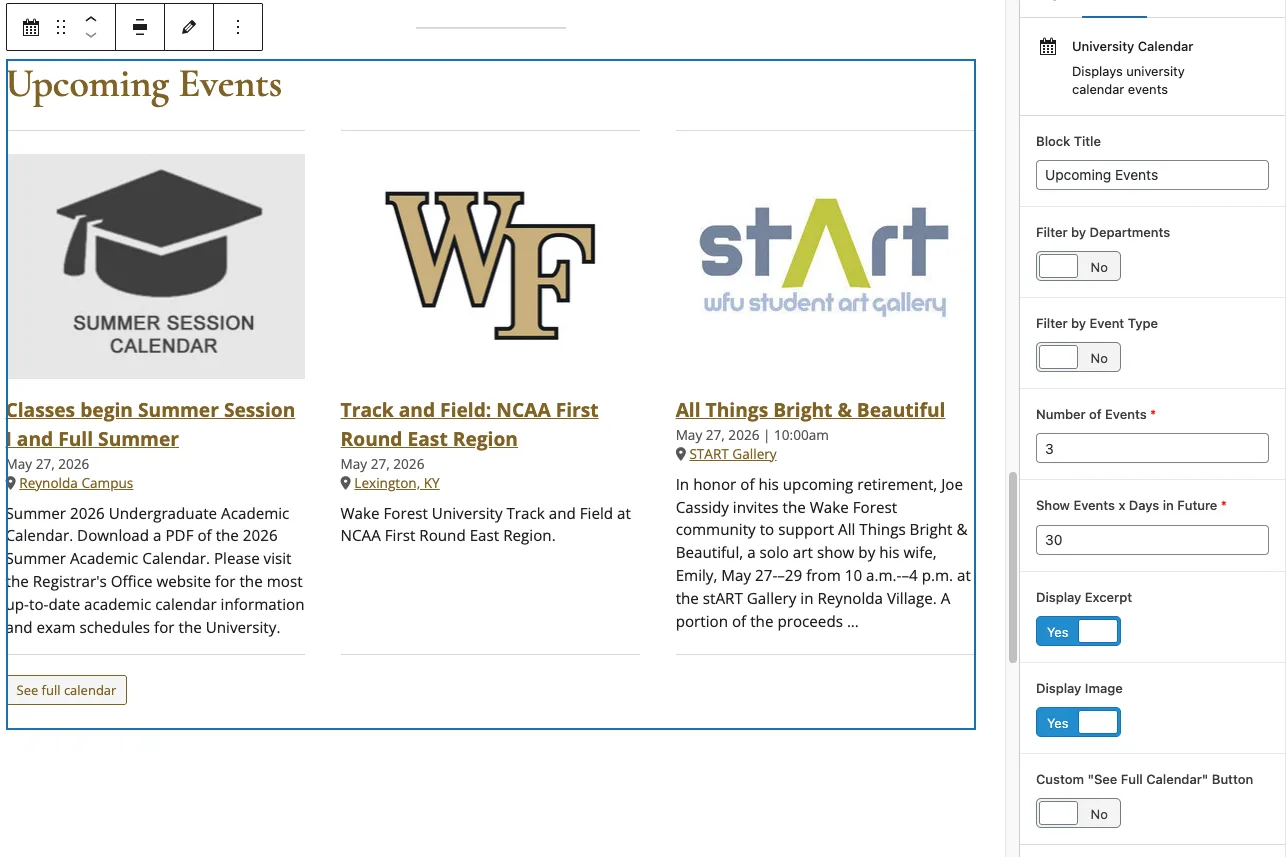
The University Events block allows you to pull your events in from the main University events calendar hosted on events.wfu.edu.
Detailed instructions on adding blocks can be found on Building a Page.
Block Settings
Block Title: The block title will add a H2 title to the top of the university events block. You can name this whatever you would like.
Filter by Departments: Allows you to choose which department events you want to include in your block. Turning this on reveals a Departments to Include selector.
Filter by Event Type: Allows you to choose which types of events you want to include in your block. Turning this on reveals an Event Types to Include selector.
Require All: Select Yes to show events matching both Department and Event type criteria. This setting only appears when both filters above are turned on.
Number of Events: The maximum number of events to pull in. Defaults to 5.
Show Events x Days In Future: Caps the number of days in the future to look for upcoming events. Defaults to 30.
Display Excerpt: Should the brief event description be displayed?
Display Image: Should the image associated with the event be displayed?
Custom “See Full Calendar” Button: The block always ends with a button. By default it reads “See full calendar” and links to events.wfu.edu. Turn this on to point the button somewhere else, such as your own department calendar.
Custom “See Full Calendar” Link: Appears when the setting above is turned on. Enter the URL the button should go to, and optionally your own button text. If you leave the text blank the button still reads “See full calendar.” If you leave the URL blank the block ignores the custom setting and falls back to the default button.