

Adjusting to the New Header & Footer
On August 20 2026, WFU WordPress sites will receive an updated header and footer featuring the new Wake Forest branding, a modernized look and feel, and accessibility improvements. Your sites will transition automatically without any action on your part.
If your site includes custom navigation, department footer content, or other unique configurations, we recommend reviewing the items below.
If something doesn’t display correctly or you have questions about the new design, please let us know through the Web Request Form. We’re happy to troubleshoot issues, recommend solutions, or help make any needed adjustments.
NOTE: If you have a custom theme, some or all of these updates may not apply to you.
Department Header

The updated header provides a cleaner, more streamlined navigation experience. If you have too many navigation labels for one line or if your navigation labels are especially long, they may wrap onto a second line.
Review your primary navigation and, where possible, edit your menu to shorten menu labels to keep the navigation on a single line. Shorter labels are generally easier for visitors to scan and improve the appearance of the header.
Gradient background on pages with Featured Images

Pages that use a featured image, slider, or video now automatically display with a gradient behind the header, enhancing the presentation of your featured imagery and complementing the updated design.
Review pages with featured items to make sure the gradient works well with your media. Most sites won’t require any changes, but if the gradient creates issues with your content, please let us know through the Web Request Form, and we can disable the gradient on individual pages. Alternatively, if you have another large full-width media block at the top of your page, we can turn the gradient on for that page.
Announcement Banner

If your site uses an Announcement Banner, it will now appear above the header and below any Wake Alert banners. To keep your site’s content prominently displayed, we recommend keeping Announcement Banner messages brief and linking to additional information when needed.
Department Footer
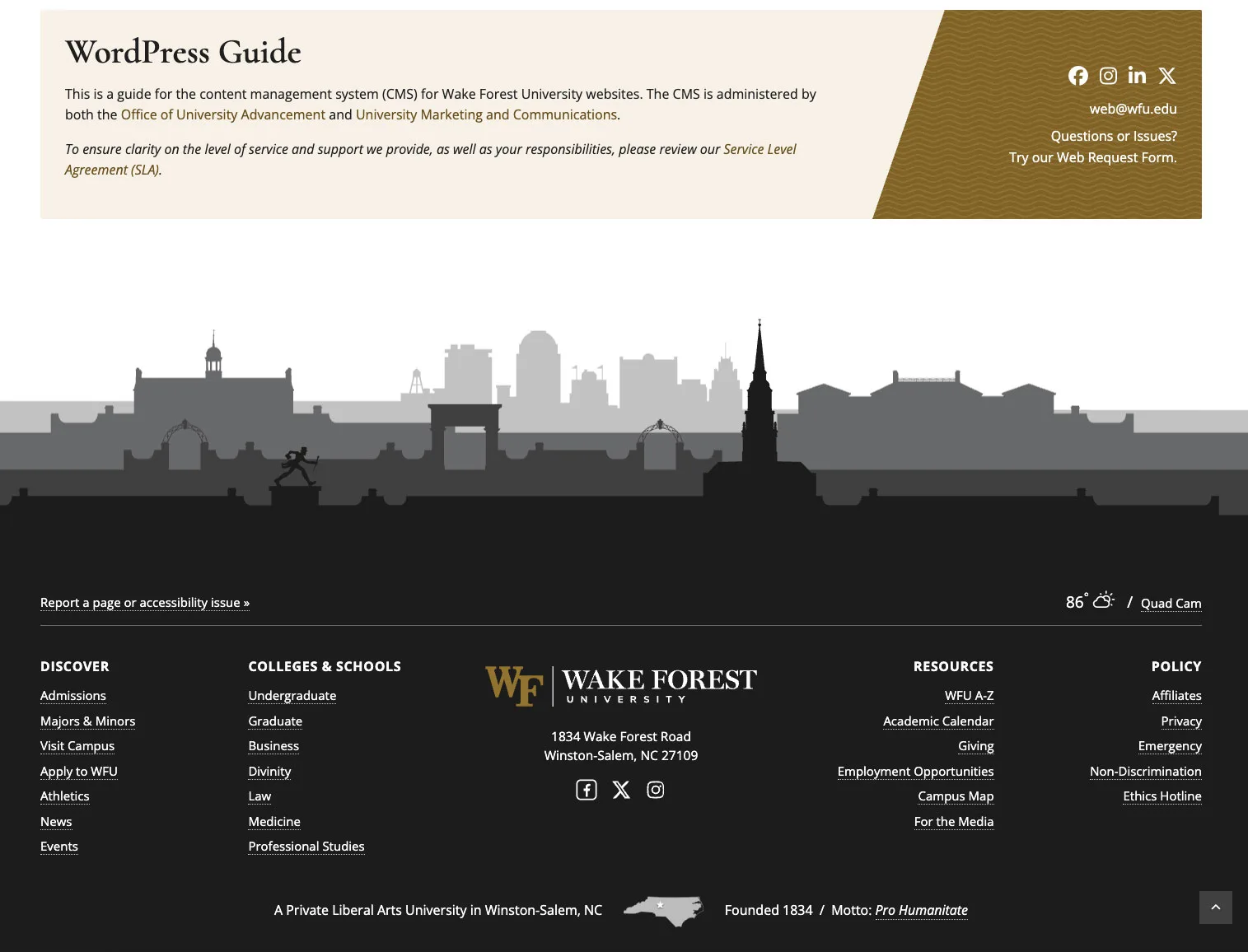
The optional department footer (the block above the campus skyline) has been redesigned to better align with the University’s updated branding while maintaining support for department-specific information.
If your site has customized footer content, review your text, links, images, and social media icons to make sure everything fits comfortably within the updated layout. You may find that small adjustments to content length or formatting improve the overall presentation.
Accessibility Improvements
Accessibility has been the primary focus of this redesign. Working closely with the University’s Technology Accessibility Team, we’ve made improvements throughout the header and footer to create a more inclusive experience for all visitors. Most of these enhancements are built into the code and won’t be visible, but they significantly improve navigation and compatibility with keyboard navigation, screen readers, and other assistive technologies. No action is required on your part.
Links That Open in a New Tab

Links configured to open in a new browser tab now automatically display an external link icon ( ) and provide additional information for screen reader users. This accessibility enhancement is applied automatically throughout your site.
If you’ve manually added text such as ”(opens in a new tab)” to navigation labels, you can now remove it. The new icon and accessibility improvements provide this information automatically, resulting in cleaner navigation and a more consistent experience.
View our Accessibility Guidance to learn when it’s appropriate to open links in a new tab.
Favicon

As part of the move to the University-wide WFU branding, all sites on the Wake Forest web platform will only use the university’s standard favicon, the WF mark. The favicon is set at the platform level and is not customized per site. A single mark keeps Wake Forest consistently identifiable in browser tabs, bookmarks, and search results, and ensures the icon stays current as the university brand evolves.
Need Help?
Again, if something doesn’t display as expected or you’re unsure how to improve your header or footer, we’re happy to help. Submit a ticket through the Web Request Form and we’ll work with you to make any needed adjustments or answer your questions.
Categories: New Feature, Update